






Design software company Figma today released a suite of new artificial intelligence-powered image editing tools directly within its platform. These features include object removal, object isolation, and image expansion, aiming to streamline workflows for designers. The updates are rolling out to Figma Design and Draw, with broader availability planned for next year, according to the company.
The launch addresses a common pain point for designers who previously needed to switch between applications to perform these tasks. Figma’s move comes as competitors like Adobe and Canva have already integrated similar capabilities, and on the same day Adobe announced integration of some features into ChatGPT. This signals a growing trend of AI-powered functionality becoming standard in creative software.
Figma’s New Image Editing Capabilities
Figma’s new tools focus on providing granular control over images without relying heavily on text prompts, a strategy the company believes complements generative AI models like Nano Banana. These models are useful for initial image creation, but often require refinement through precise editing.
Object Removal and Isolation
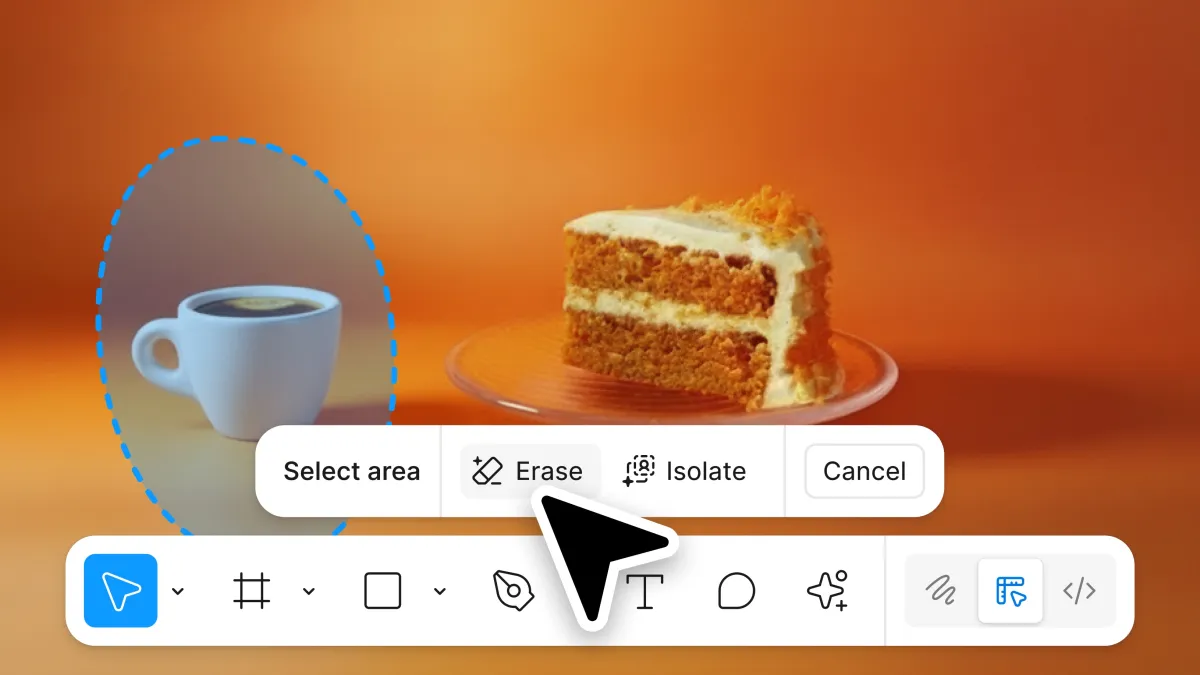
The updated lasso tool is central to these new features. Users can now select specific objects within an image using the lasso, then choose to remove them entirely. Figma intelligently fills in the space left behind, attempting to seamlessly blend the edited area with the surrounding image.
Additionally, the lasso tool allows for object isolation. Designers can select an object and move it within the image while preserving its original lighting, shadows, and color relationships with the background. This is particularly useful for compositing and rearranging elements within a design.
Image Expansion with AI
The new image expansion feature tackles the challenge of adapting designs to different aspect ratios. When expanding an image, Figma uses AI to generate new content that logically extends the existing scene. This eliminates the need for repetitive cropping and manual adjustments, saving designers time and effort. For example, a 1×1 image can be expanded into a web or mobile banner format.
This feature is especially valuable for social media marketing, where creatives often need to produce multiple versions of an image optimized for different platforms. The ability to quickly and intelligently expand images reduces the workload associated with these variations.
Streamlined Workflow with a New Toolbar
To improve accessibility, Figma is consolidating all of its image manipulation tools into a single, dedicated toolbar. This includes the object selection and removal features, as well as options for background color changes and adding annotations.
According to Figma, background removal is one of the most frequently used actions on the platform, so it will receive prominent placement within the new toolbar. This centralized approach aims to make common editing tasks more intuitive and efficient.
Catching Up to the Competition and Integrating with AI Ecosystems
Figma’s introduction of these features represents a significant step in closing the gap with established design giants like Adobe, which has offered object removal and similar tools in Photoshop for several years. Canva has also integrated AI-powered editing capabilities into its popular design platform.
However, Figma’s approach differs slightly by emphasizing non-prompt-based editing. This caters to designers who prefer direct control over their images rather than relying on generative AI to interpret text instructions. The company believes this hybrid approach offers the best of both worlds.
The timing of the launch is also notable, coinciding with Adobe’s announcement of bringing similar photo editing features to ChatGPT. Figma was an early partner in OpenAI’s GPT ecosystem, integrating ChatGPT into its platform in October. It remains unclear whether the new Figma tools will be accessible to users working within the ChatGPT environment.
The integration with ChatGPT highlights the broader trend of AI becoming deeply embedded in the design process. Designers are increasingly using AI tools for tasks ranging from ideation and content generation to automated editing and optimization.
Looking ahead, Figma plans to extend these design tools to its entire suite of applications throughout the next year. The company will likely continue to monitor user feedback and iterate on these features, potentially adding new AI-powered capabilities based on emerging technologies and industry trends. The extent to which these features will integrate with other AI platforms, like Adobe’s offerings within ChatGPT, will be a key area to watch.
The success of these features will also depend on how well Figma balances AI assistance with designer control, ensuring that the tools enhance creativity rather than replacing it. Further updates and performance improvements are anticipated as Figma refines its AI algorithms and expands the functionality of its image editor.